
September 20, 2026
Build a quest once, use it in all your classes
The same quest can now be shared across multiple classes. You only need to edit it once, and every class using it
gets the changes.
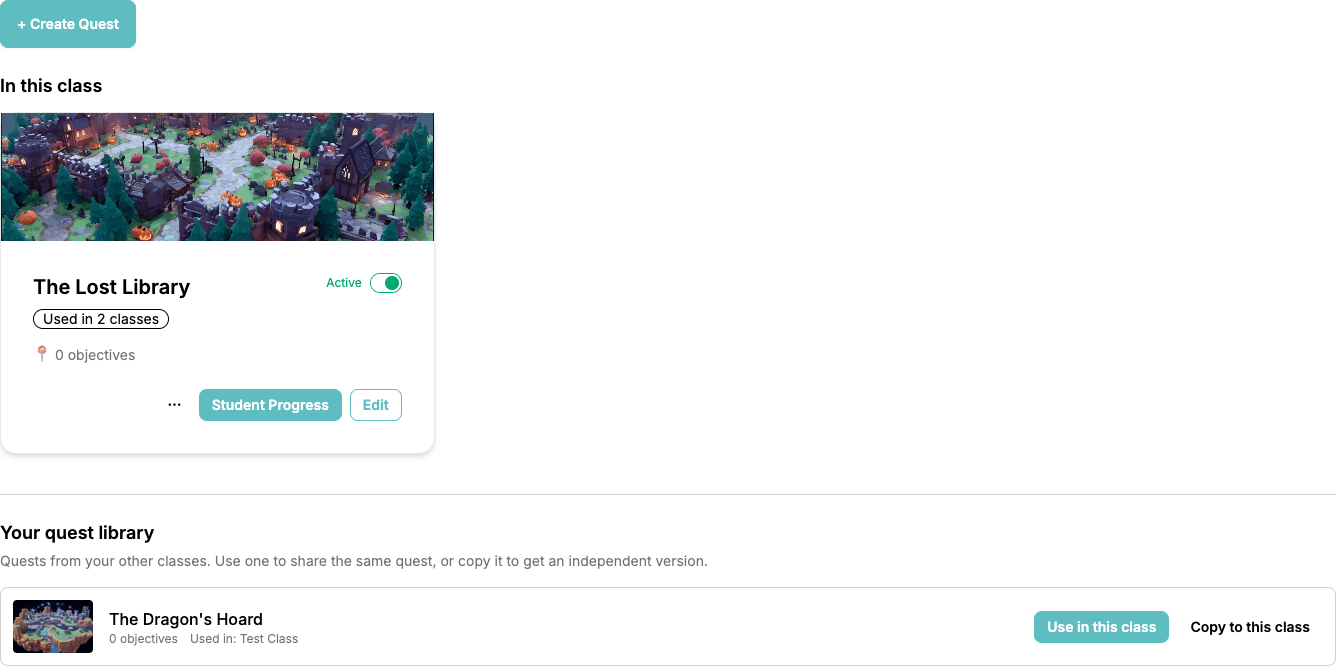
📚 Your Quest Library
The quest list page is now split in two:
- In this class: the quests this class is running right now
- Your quest library: every other quest you can reach, meaning the ones you built in your other classes plus the ones a co-teacher shared with you
Each library entry has two buttons, and the difference matters:
- Use in this class: the same quest now runs in both classes. Edit it once and every class gets the change.
- Copy to this class: an independent duplicate you can take in a completely different direction.
🎚️ Active in One Class, Draft in Another
Every quest card has a Used in N classes badge. Click it and you get a tick box per class, plus an Active / Draft
toggle for each one.
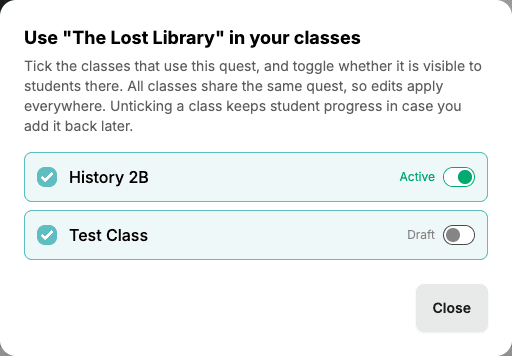
So your Monday group can already be adventuring while your Thursday group still sees nothing. If you untick a class,
that class's student progress is kept. Add the quest back later and your students simply continue where they left off.
🧩 Already Made Copies? Combine Them.
If you've been keeping several classes in sync by hand, ClassMana now spots those look-alike quests and offers to
fold them back into one shared quest, including all the student work on each copy.
When duplicates are found, a banner appears above your quest library with a Combine quests button. That opens a
two-step wizard:
- Pick the quest to keep: you see each group of look-alikes with their maps, objective counts, the classes using them and how many student submissions they have. Choose the copy you consider most up to date.
- Compare and combine: a side-by-side table shows exactly what the combined quest will look like, objective by objective, before anything changes.
Every column in that table gets a badge telling you how straightforward it is to fold that quest in: Easy merge,
Tricky merge, or Risky merge. Risky ones start unticked, so you can safely combine the clean ones first and deal
with the odd one out separately.
Your students' work comes along too: submissions move onto the matching objective of the quest you keep. Rewards are
never handed out twice, so there's no accidental Experience, Gold, Mana or Health.
🧭 Where to Start
Open the quest page of any class. If you already have copies lying around, you'll probably see the combine banner
waiting for you at the top of your library. Otherwise, build your next quest in one class and click Use in this
class from the others.
There's also a step-by-step walkthrough of the merge wizard in
Combining Duplicate Quests.
💬 Keep the Ideas Coming
This one came from teacher feedback too. Several of you told me you were maintaining four copies of the same quest by
hand. If there's something else you keep wishing ClassMana could do, let me know. And if you'd like to help shape what's
next, join the conversation in our Facebook group.
Join the Conversation! Have thoughts or questions about this article? Join our ClassMana Facebook Community to share your ideas, ask questions, and connect with other like-minded educators!