
November 7, 2026
Classroom Management Apps for Teachers: What Each Type Is Actually For
Search for "classroom management apps" and you'll get lists of 15, 25 or even 64 apps. Most of them do completely
different jobs. A parent messaging app, a countdown timer and a tool that locks students' Chromebooks are all called
"classroom management", but they solve different problems.
You don't need 25 apps. Most teachers need two or three, each doing one job well. This guide sorts classroom
management apps by the job they do, so you can see which jobs you actually need to fill.
Full disclosure: we make ClassMana, one of the apps below. We've tried to describe every app
fairly. Information about other products comes from their public websites as of November 2026.
The seven types at a glance
| Type | What it's for | Examples | Who usually picks it | Students need devices? |
|---|---|---|---|---|
| Behavior and motivation | Rewarding behavior, effort and teamwork all year | ClassMana, ClassDojo, ClassBank | Teacher | No |
| School-wide PBIS platforms | The same points system across the whole building | LiveSchool, PBIS Rewards, Critter Coin | School or district | No |
| Classroom display tools | Timers, noise meters, random pickers, groups | Classroomscreen, ClassMana's free tools | Teacher | No |
| Family communication | Messaging parents and guardians | ClassDojo, Remind | Teacher or school | No |
| Assignments and learning (LMS) | Handing out work, collecting it, giving feedback | Google Classroom, Canvas, Schoology | Usually the school | Yes |
| Quiz and review games | Practicing content in a fun way | Kahoot, Blooket, Gimkit | Teacher | Yes, usually |
| Screen monitoring (IT software) | Seeing and guiding what's on student devices | GoGuardian Teacher, LanSchool, Lightspeed | District IT | Yes |
The first three types are about behavior and the flow of your lesson. That's what most teachers mean when they say
"classroom management". The others help with communication, coursework and devices.
1. Behavior and motivation apps
The job: encourage the behavior you want to see, every day, for the whole school year. This is the core of classroom
management, and it's the type of app that changes your classroom the most.
The simplest versions are digital point charts: you give a student a point for being on task, and the class sees the
total. That works well for a few weeks. The question is what keeps students interested in month six.
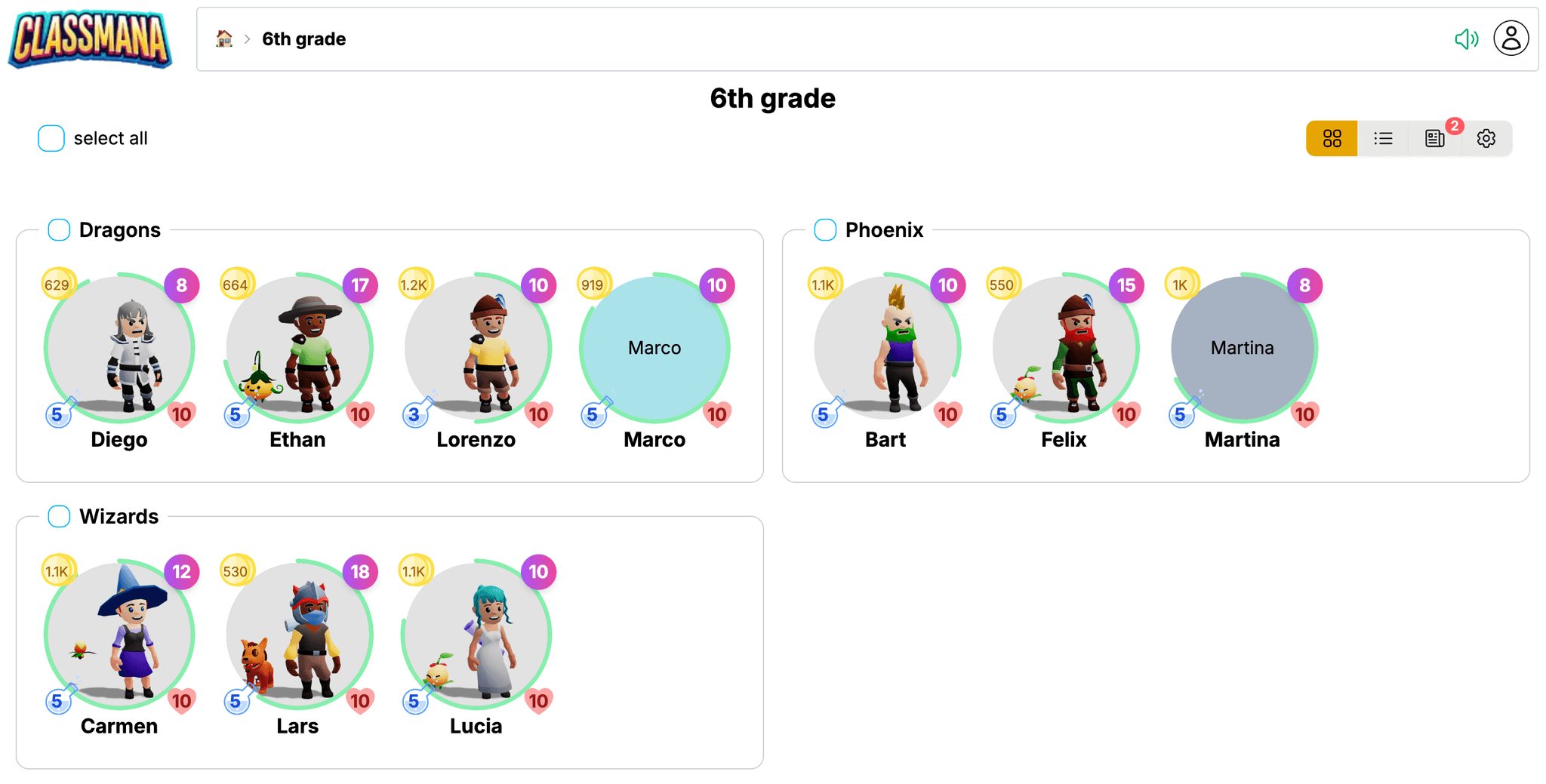
- ClassMana turns your classroom into a role-playing game. Every student has an animated 3D avatar they customize and level up with Experience, unlocking gear across 35 levels. They earn mana for powers (real classroom privileges you choose, like picking their seat), spend gold in a class shop, and lose health for warnings, with a way to redeem themselves. Teams, boss battles for review and a noise challenge add goals for the whole class. It works from primary school to university, and students don't need an email address.
- ClassDojo is free for teachers and best known for points, skills and parent communication. The game side is light: the focus is on points and messaging.
- ClassBank runs a classroom economy: bank accounts, classroom jobs with salaries, bills and a class store. It's a good fit if financial literacy is one of your goals.
Choose this type first. If you only pick one classroom management app, pick one of these. For detailed comparisons,
see the best ClassDojo alternatives, the
best classroom economy apps and the
best gamification tools for middle and high school.
2. School-wide PBIS platforms
The job: run one positive behavior system across every classroom in a school, with data for the PBIS team.
LiveSchool, PBIS Rewards and Critter Coin let all staff award points against the school's expectations.
Students spend those points in a school store, and administrators see dashboards. Some add parent access and office
referral tracking.
These platforms are bought by the school, not by one teacher. If your school already has one, you don't need to replace
it. Many teachers add a classroom game on top for daily motivation. See
how to use ClassMana alongside your school's PBIS system and our overview of the
best PBIS reward apps.
3. Classroom display tools: timers, noise meters and random pickers
The job: run the moments of a lesson smoothly. Show how much time is left, keep the volume down during independent
work, pick a student fairly, or make groups in seconds.
These are the apps you put on the board. Students don't need devices, and they work in any grade.
- Classroomscreen is an online whiteboard with widgets for the board. Its Basic plan is free and includes all 26 widgets, among them timers, a randomizer and a group maker. Pro adds custom themes and backgrounds for $36 a year (billed annually).
- ClassMana's teacher tools are free with a ClassMana account, with no trial limit:
- the Silence Challenge, a noise meter where a dragon sleeps while the class is quiet and wakes up when it gets too loud
- a timer and a stopwatch
- a random student picker that can skip students who already had a turn and make random groups
- the Monster Battle, a 3D boss fight for review, and Mystery Events for random class activities
The difference: Classroomscreen is a general board with many small widgets. ClassMana's tools are fewer but more
game-like, and they connect to the class game if you use it.
4. Family communication apps
The job: keep parents and guardians informed without handing out your phone number.
- ClassDojo combines points with parent messaging and class photos, with automatic translation in 190+ languages.
- Remind (now part of ParentSquare) has an always-free plan for teachers. It offers two-way messaging by text, app, email or web, in families' preferred languages.
Many schools already choose one family communication app for everyone. Check that before you start your own.
5. Assignments and learning management (LMS)
The job: hand out work, collect it and give feedback.
Google Classroom is part of Google Workspace for Education, whose Education Fundamentals edition is provided at no
cost. Many schools use Canvas or Schoology instead. An LMS keeps your coursework organized, but it doesn't help
much with behavior in the room. It's usually chosen by the school.
6. Quiz and review games
The job: practice content in a way students enjoy.
Kahoot, Blooket and Gimkit turn review into a game for one activity. Kahoot has free tools and a paid
toolkit, Kahoot!+. These are great for engagement during a lesson, but they don't run across the school year or reward
behavior. They're a different category from classroom gamification, and many teachers use both.
If you want a review game without student devices, ClassMana's Monster Battle runs on the board: the class answers
questions together to defeat a 3D monster.
7. "Classroom management software" for student devices
If you search for "classroom management software", you'll find a different kind of product: tools that let a teacher see
what's on students' screens, guide them to the right page and limit distractions. GoGuardian Teacher, LanSchool
and Lightspeed Classroom Management are examples.
These matter in schools with one device per student. But they're bought and installed by district IT, so a teacher can't
usually start one alone. And they manage devices, not behavior or motivation. If your students are distracted on their
Chromebooks, ask your IT team whether your school already has one.
How to build your classroom management app stack
Pick one app per job, and only for the jobs you actually have. Three common setups:
Elementary class, no student devices
- Behavior and motivation: a class game like ClassMana, or ClassDojo if parent messaging matters most
- Board tools: a timer, a noise meter and a random picker
- Family communication: whatever your school already uses
Middle school with one Chromebook per student
- Behavior and motivation: something with real depth, because older students see through simple point charts
- LMS: the one your school uses
- Screen monitoring: if your district provides it
- Review games: one quiz game for test prep
High school teacher with five classes a day
- Behavior and motivation: a tool where you can set up rewards once and reuse them across all your classes (ClassMana calls this shared configuration)
- LMS: the one your school uses
- Board tools: a timer for transitions and a random picker for fair participation
Notice what's missing: no setup has ten apps. Every app you add is another login, another set of class lists and another
thing to explain to students.
Common mistakes when choosing classroom management apps
- Choosing by list length. "25 best apps" lists mix all seven types. Decide the job first, then compare the apps that do that job.
- Picking something slow. If rewarding a student takes more than a few seconds in the middle of a lesson, you'll stop doing it.
- Using a public ranking that shames students. A leaderboard tends to motivate the students at the top and discourage the rest. Team goals and personal progress work better.
- Ignoring privacy. Check what student data an app needs. Apps that work without student email addresses are easier to get approved.
- Starting everything in September. Introduce one app at a time. Add the next one when the first is a habit.
Frequently asked questions
What is the best classroom management app for teachers?
It depends on the job. For behavior and motivation, pick a system that keeps students interested all year:
ClassMana if you want a classroom game with avatars, levels and powers, or ClassDojo if parent
messaging is your top priority. For board tools like timers and noise meters, Classroomscreen and ClassMana's free tools
are both good options.
What is the best free classroom management app?
ClassDojo is free for teachers. Classroomscreen's Basic plan is free, and ClassMana's teacher tools (Silence Challenge,
timer, stopwatch, random picker, Monster Battle and Mystery Events) are free with an account. ClassMana's full class
game has a free three-week trial, then paid plans start at $75 per year per teacher in the US (€65 in most of Europe).
See pricing.
Which classroom management apps work without student devices?
Behavior apps (ClassMana, ClassDojo), board tools (Classroomscreen, ClassMana's teacher tools) and family communication
apps all work with only the teacher's computer and a projector or smartboard. In ClassMana, student logins are optional:
you can run the whole game from your board and let students log in later to customize their avatars.
What is the difference between classroom management apps and classroom management software?
Teachers usually mean apps for behavior, motivation and lesson flow. IT departments often mean software that monitors
and controls student devices, like GoGuardian Teacher or LanSchool. Both use the same words, but they solve different
problems and are bought by different people.
Do I need my school's approval to use a classroom management app?
Many schools have a list of approved apps or require a data privacy agreement, so check with your school first. Apps
that need little student data are usually easier to approve. ClassMana students log in with a first name and a login
code, with no email address or other personal information. See our school guide.
How many classroom management apps should I use?
Usually two or three: one for behavior and motivation, one for board tools, and the family communication app your school
already uses. Add an LMS or review games when your teaching needs them.
Conclusion
The best classroom management app isn't the one at the top of a list of 25. It's the one that does the job you need,
fast enough to use in the middle of a lesson, and interesting enough that students still care in the spring.
If behavior and motivation is your biggest job, try a classroom game.
Try ClassMana for free: the teacher tools are free, and you can use a full class for three
weeks.
Join the Conversation! Have thoughts or questions about this article? Join our ClassMana Facebook Community to share your ideas, ask questions, and connect with other like-minded educators!