
November 7, 2026
12 Classroom Management Games That Work From Kindergarten to High School
A classroom management game turns an expectation into a goal the class can win. Instead of asking for quiet for the
fifth time, you challenge the class to keep a dragon asleep. Instead of nagging about a slow transition, you race the
clock. The rules are the same, but now students want to follow them.
Most lists of classroom management games are written for elementary school. They work well there. But a fifteen-year-old
won't play "Simon Says", and a sticker chart doesn't survive the first week of eighth grade. This guide gives you 12
games that cover the situations every teacher deals with: noise, transitions, participation and behavior over the whole
year. For each game you get how to play it without any technology, how to adapt it for middle and high school, and a
digital version if you want the game to keep score for you.
Full disclosure: we make ClassMana, a classroom game that includes digital versions of several
games below. Every game here also works with a whiteboard and a marker.
What makes a classroom management game work
Before the games, five rules that decide whether a game helps you or becomes one more thing to manage:
- The whole class wins together. Games where the class plays against a challenge (the clock, a monster, the noise level) build cooperation. Games where students compete against each other build winners and losers.
- Feedback is instant and visible. Students need to see right away that they're winning or losing. A points total that you announce on Friday is too slow.
- Rounds are short. A game that lasts two minutes can be played ten times a day. A game that lasts a month needs smaller wins along the way.
- Nobody is publicly shamed. Take points away from the class or a team, never put one student's name on a "bad" list in front of everyone.
- The reward is cheap but wanted. Privileges (choosing the music, sitting with a friend, five minutes of free time) work better and cost less than candy or prizes, especially with older students.
Games for noise and focus
1. Don't Wake the Dragon
Best for: independent work, tests, calming down after a break. Grades: K–12.
How to play: a dragon is asleep. As long as the class works quietly, it stays asleep. When the noise gets too loud,
the dragon wakes up and the class loses a point (or the round). Keep it asleep until the timer runs out and the class
earns a point toward a reward.
No-tech version: draw a sleeping dragon on the board. You are the judge of the noise: when it gets too loud, you
draw one eye open. Two open eyes and the round is lost.
Middle and high school: frame it as a focus challenge, not a punishment. Agree on a noise level together (a whisper
with your neighbor is fine, talking across the room isn't) and let the class set the goal: "Can we keep it asleep for
the full 20 minutes?"
Digital version: the Silence Challenge listens through your computer's microphone and shows the
dragon on your classroom screen. You set the noise limit with a slider and optionally a countdown timer. It's free, and
students don't need an account or a device. This takes the judging away from you: the class argues with the dragon, not
with the teacher.

2. Silent Ball
Best for: a reset after a noisy moment, the last five minutes of class. Grades: 2–8.
How to play: students stand or sit on their desks and toss a soft ball to each other without a sound. Anyone who
talks, makes a bad throw or drops an easy catch sits down. The last students standing win.
Middle and high school: play it as a review game: before throwing, the catcher has to answer a quick question from
you in a whisper. Older students like it more when there's something to know, not just something to catch.
3. Secret Goal
Best for: focus during a specific activity. Grades: K–12.
How to play: write one goal on a piece of paper and don't tell the class what it is ("everyone has their materials
out within one minute", "nobody interrupts during group work"). At the end of the lesson, reveal the goal. If the class
met it, they earn a point.
Middle and high school: works especially well, because students can't game a rule they don't know. They end up doing
everything well, just in case.
Games for transitions and routines
4. Beat the Clock
Best for: lining up, cleaning up, switching activities. Grades: K–12.
How to play: set a timer for the transition and say the target out loud ("Desks clear and books out in 45 seconds").
If the class makes it, they earn a point. Lower the target as they get faster.
No-tech version: count down out loud or use a sand timer.
Middle and high school: keep a class record on the board and challenge them to beat their own best time. Teenagers
compete hard against a record.
Digital version: any countdown timer on the board works, like ClassMana's free classroom timer.
5. Beat the Teacher
Best for: routines you want every day (coming in quietly, being prepared, staying on task). Grades: K–12.
How to play: draw two columns on the board: "Class" and "Teacher". When the class follows a routine, they get a
point. When they don't, you get a point. First to 10 (or the most points at the end of the week) wins. If the class
wins, they earn a small reward.
Middle and high school: make it per period and let the classes compete against each other's scores. Keep the
teacher's points few and specific, so it never feels like you're scoring every small mistake.
6. Mystery Student
Best for: walking in the hallway, transitions, group work. Grades: K–8.
How to play: secretly pick one student at the start of the transition. If that student follows the expectations the
whole time, reveal their name and the class earns a point. If not, don't reveal the name: say "our mystery student
wasn't quite there today" and move on.
Middle and high school: pick the student with a random name picker you don't show, and reveal only the good news.
The not-revealing part matters: it keeps the game from turning into shaming.
Digital version: a random student picker chooses the student so nobody can say you picked on
purpose.
Games for participation and review
7. Boss Battle
Best for: review before a test, a low-stakes quiz, the end of a unit. Grades: 3–12.
How to play: the class teams up against a monster. Draw it on the board with a health bar of, say, 20 points. Ask
review questions. Each right answer takes damage off the monster. Each wrong answer lets the monster hit back (the class
loses a "life"). The class wins if the monster's health reaches zero before they run out of lives.
Middle and high school: this is the game older students like most, because it speaks the language of the games they
already play. Make the monster stronger as the year goes on and let students suggest the monster's name.
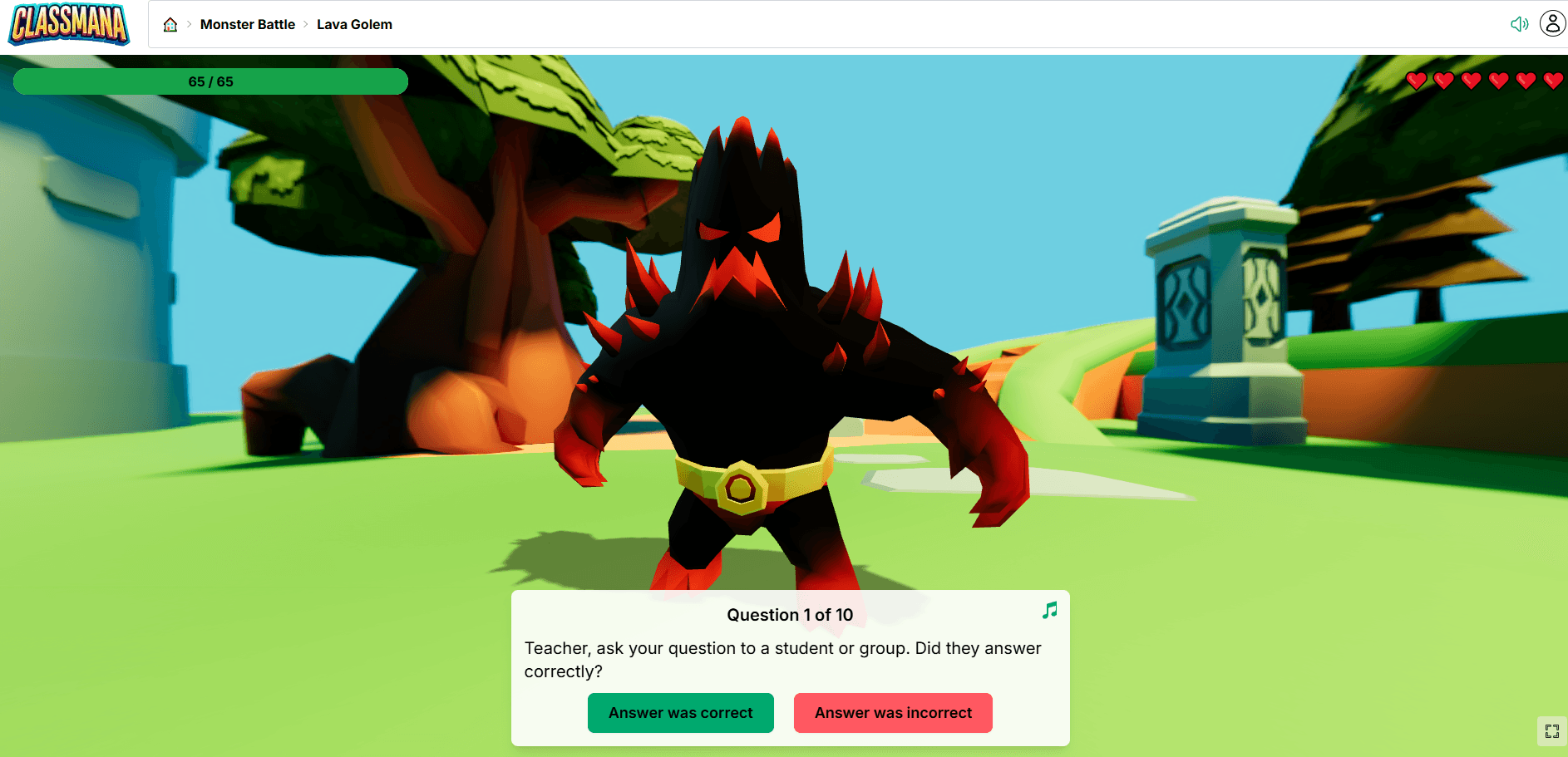
Digital version: Monster Battle runs the whole fight on screen: pick a monster, ask your
questions and click right or wrong. It needs no setup and is free with a ClassMana account. In a Class Adventure you can
also call on single students, a whole team or the full class.
8. Lucky Draw
Best for: cold calling without the fear, fair turn-taking. Grades: K–12.
How to play: instead of picking who answers, let chance decide. Pull a name from a jar of craft sticks. Every
student has the same chance to be picked, so everyone has to be ready.
Middle and high school: add a "phone a friend" lifeline so a picked student can pass the question to a classmate
once per lesson. It keeps the pressure fair.
Digital version: a random student picker on the board. ClassMana's picker can skip students
who already had a turn until everyone has been picked, and it can also form random groups.
9. Mystery Events
Best for: warm-ups, brain breaks, a surprise reward. Grades: K–12.
How to play: prepare a deck of cards with short surprises: a one-minute stretch, a riddle for the class, "everyone
gets five minutes of free reading", a team challenge, "the teacher has to do ten jumping jacks". Draw one at the start
of the lesson or when the class earns it.
Middle and high school: let students write their own cards (you approve them). Ownership makes them care, and their
ideas are often better than ours.
Digital version: Mystery Events show a random event on the board with one click. You can
turn individual events on or off and add your own.
Games for behavior over the whole year
The games above work in minutes. The ones below work over weeks and months: that's where real behavior change happens,
and where most games fall apart because they become too much work.
10. Team Points
Best for: cooperation, accountability between classmates. Grades: 2–12.
How to play: split the class into teams of four or five, with mixed abilities. Teams earn points for following
expectations, helping each other and completing work. Every few weeks, the team with the most points earns a privilege,
and then you reshuffle the teams.
Middle and high school: let the teams pick their own names, and give points for helping teammates, not only for
individual results. Students start to remind each other of the rules, so you don't have to.
11. Class Shop
Best for: long-term motivation, delayed gratification. Grades: 2–12.
How to play: students earn a class currency for good behavior and effort and spend it in a class shop. The best
items cost you nothing: choose your seat for a day, use your phone for music during work time, skip one homework item,
be the teacher's assistant.
Middle and high school: price items so students have to save for the good ones. That's where the real lesson is. If
financial literacy is a learning goal, see our comparison of
classroom economy apps.
12. The Class Adventure
Best for: turning the whole school year into one game. Grades: 3–12, and even university.
How to play: each student has a character that levels up. Good behavior and effort earn Experience. Breaking
classroom rules costs Health. Students spend Gold in a shop and use powers you decide on (for example "turn in homework
one day late" or "ask the teacher a question during a test"). Teams fight bosses together. It combines games 5, 7, 10
and 11 into one system that runs all year.
No-tech version: possible with a spreadsheet and character sheets, and some teachers run it this way. It takes a lot
of bookkeeping, which is why most teachers who try it on paper move to a tool.
Digital version: this is what ClassMana is built for: students have 3D avatars, earn
Experience, Gold and Health, use powers and shop on their own, and log in with a code instead of an email address. You
can try a full class free for 3 weeks. After that, Premium is $75 per year per teacher in the US (€65 in most of
Europe). If you used Classcraft before it shut down, see how ClassMana compares.
How to adapt classroom management games for middle and high school
Teenagers love games. They just don't love games that treat them like they're seven. A few changes make the difference:
- Use their vocabulary. Levels, bosses, loot, powers and teams sound like the games they play at home. Stickers and stars sound like primary school.
- Give choices. Let students pick how to spend their points, which power to use or which side quest to take. Autonomy is a stronger motivator than any prize.
- Reward with privileges, not stuff. Sitting where you want or picking the music is worth more to a sixteen-year-old than a pencil.
- Make teams matter. Older students care more about their peers than about the teacher's approval. Team goals use that.
- Let the quiet students win too. Points for preparation, effort and helping others give every student a way to succeed, not only the fastest ones.
For a deeper comparison of tools for older students, see
the best classroom gamification tools for middle and high school.
Keeping the games working all year
Every classroom management game works in week one. The question is whether it still works in February.
- Raise the bar. When the class reliably beats the clock in 45 seconds, make it 35.
- Rotate. Use two or three games at a time and swap one out every few weeks.
- Fade the rewards. Start with a reward for every round, then every three rounds, then once a week. The routine stays, the bribe disappears.
- Let students run it. A student can be the timekeeper, the mystery student picker or the shopkeeper. Running the game is itself a privilege.
- Keep it cheap for you. If a game takes you ten minutes of bookkeeping a day, you'll stop playing it. Use a tool or simplify the game.
Mistakes to avoid
- Punishing the whole class for one student. If one student keeps waking the dragon, talk to that student privately instead of letting the class lose every time. Otherwise the class turns against them, and the game loses its point.
- Public "bad" lists. Scores on the board should belong to the class or a team, not to one student who's having a bad day.
- Rewards that are too far away. A pizza party in June doesn't change behavior in October.
- Too many rules at once. Start with one game for one problem. Add the next one when the first runs by itself.
What teachers say
These are real comments from teachers who use ClassMana, quoted as they wrote them.

Holly Williams
I like that it's a fun way to reward and motivate students and
keep them accountable for things like being on time and prepared.

Angelika Pratl
I personally love the team function, because
it really encourages the kids to look after each other and cooperate.

Beth Buehler
I love the ownership it gives kids of their own behavior.
Frequently asked questions
What are classroom management games?
Classroom management games turn classroom expectations, like working quietly, transitioning quickly or helping each
other, into a challenge students can win. The class earns points or rewards for meeting the goal, so following the rules
becomes something students want to do instead of something the teacher has to enforce.
Do classroom management games work in high school?
Yes, if they're designed for teenagers. Games where the class beats a challenge together (a timer, a noise level, a
boss) work at every age. For high school, use game vocabulary like levels and bosses, give students choices, reward them
with privileges instead of prizes and play in teams.
What is a good classroom management game for a noisy class?
"Don't Wake the Dragon" is one of the most effective: the class keeps a dragon asleep by staying under a noise limit.
You can play it with a drawing on the board, or for free with ClassMana's Silence Challenge, which
measures the noise through your computer's microphone.
Are there free digital classroom management games?
Yes. ClassMana's Silence Challenge, Monster Battle, Mystery Events, classroom timer and random student picker are free
to use. A full Class Adventure, with avatars, a class shop and powers, can be tried free for 3 weeks with one class.
For other kinds of apps (timers, parent messaging, quiz games), see our guide to
classroom management apps for teachers.
How do I stop one student from ruining the game for the whole class?
Don't let one student make the whole class lose again and again. Talk to that student privately, give them a role in the
game (timekeeper, scorekeeper), or switch to team-based scoring so one student's behavior affects a small team instead
of everyone.
How often should I play classroom management games?
Short games like Beat the Clock or Don't Wake the Dragon can be played several times a day as part of your routines.
Long-running games like team points, a class shop or a Class Adventure run in the background all year, with a reward
moment every week or two.
Try it in your class
Pick one game for the problem that costs you the most time this week, and play it for five days. If you want the game to
keep score for you, create a free ClassMana account: the Silence Challenge and Monster Battle are ready to
use in a minute.
Join the Conversation! Have thoughts or questions about this article? Join our ClassMana Facebook Community to share your ideas, ask questions, and connect with other like-minded educators!