
November 13, 2026
Classroom Review Games: 15 Games From Elementary to High School
The best classroom review games make every student think about every question, even when it isn't their turn. Games like
Grudgeball, Trashketball and a whole-class Boss Battle do that with nothing more than a whiteboard. Digital games like
Kahoot! or Monster Battle add speed and a scoreboard. Most of the games below need no prep beyond the review questions
you already have.
I make ClassMana, a classroom game with a review game built in, so I can also look at how
teachers run review games in real classes. Since March 2026, teachers have finished 6,798 Monster Battles in 2,323
classes. I'll use those numbers where they say something useful, and point out where they can't.
You don't need ClassMana for any of this. Every game in this post works with a whiteboard and a set of questions.
What makes a review game work
A review game is only worth the time if students practice more than they would with a worksheet. These rules decide
that:
- Everyone answers every question. If only the student whose turn it is thinks, the rest of the class is waiting. Let every student write the answer down (mini whiteboards, scrap paper) before you reveal it.
- You pick who answers, at random. Hands up means the same five students answer everything. A random pick keeps the others ready, because it could be them. In ClassMana's Monster Battles, where a random student, team or the whole class answers each question, on average 7 different students earn a reward for a right answer in one battle.
- A wrong answer doesn't knock anyone out. Elimination games send the students who need the review most back to their seats first. Keep everyone in the game until the end.
- The game part is short. Shooting a ball or rolling a die is fun, but a round should be mostly question and only a little game. If the shooting takes longer than the answering, students are practicing basketball.
- The class can win. A game the class always loses stops being fun after the second try.
No-tech review games for the whole class
1. Grudgeball
Best for: test review in grades 4 to 12, any subject.
How to play: split the class into teams and draw ten X's for each team on the board. A team that answers correctly
erases two X's from any other team. Then it gets a shot at the trash can with a soft ball: make it, and it can erase a
few more X's. A team that loses all its X's can still answer questions and earn some back, so nobody is out.
Grudgeball works because the "grudge" part (who do we take X's from?) makes students care about every team's score, not
only their own. If your class takes the grudges too personally, let teams erase X's only from the team in the lead.
2. Trashketball
Best for: quick review in grades 3 to 12, especially at the end of a unit.
How to play: teams take turns answering questions. A correct answer earns one point and a shot with a crumpled paper
ball at the trash can. Tape two lines on the floor: a shot from the near line is worth one extra point, a shot from the
far line two.
To keep the whole class busy, let every student write down the answer and pick the team member who answers at random.
Otherwise the strongest student in each team answers everything.
3. Boss Battle
Best for: review before a test, a low-stakes pop quiz, grades 3 to 12.
How to play: the whole class teams up against one monster. Draw it on the board with a health bar of, say, 20
points. Every right answer takes damage off the monster. Every wrong answer lets the monster hit back, and the class
loses a life. The class wins if the monster runs out of health first.
Because the class plays together against the monster, nobody loses to a classmate. That makes it a good fit for classes
where a team game turns into an argument. Older students like it most, because it uses the language of the video games
they already play.
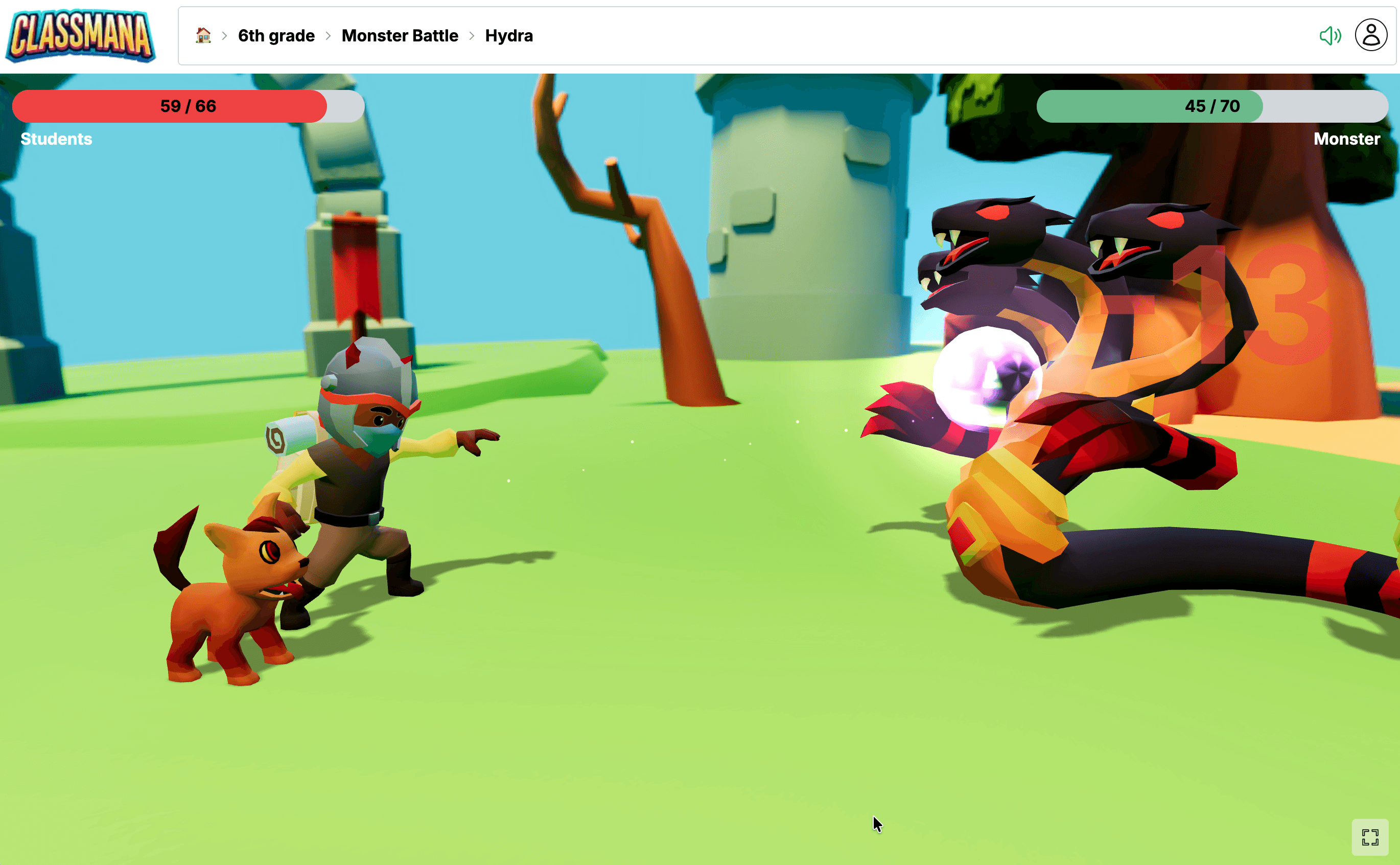
Digital version: Monster Battle runs the fight on screen with an animated monster.
There's more about it near the end of this post.
4. Jeopardy
Best for: a final review that covers several topics, grades 4 to 12.
How to play: make a grid with one column per topic and questions worth 100 to 500 points in each column. Teams pick
a square, and harder questions are worth more. A slide deck or a grid of sticky notes on the board both work.
Jeopardy takes the most prep of any game here, so make the board once per unit and reuse it. It also lets teams choose
easy questions all the time. A rule that the 500-point question in each column has to be played before the round ends
fixes that.
5. Whiteboard Showdown
Best for: checking understanding during the lesson, any grade.
How to play: every student has a mini whiteboard (a sheet of paper in a plastic sleeve works too). Read a question,
give students a fixed time, then everyone holds up their answer at the same moment. Count the correct boards for a class
score and try to beat it next round.
This is the game where you learn the most as a teacher, because you see 30 answers at once. If half the class gets a
question wrong, you know what to reteach before the test.
6. Around the World
Best for: fast recall (math facts, vocabulary, dates), grades 1 to 8.
How to play: one student stands next to a classmate's desk. Show a flash card, and whoever answers first moves on to
the next desk. The goal is to travel all the way around the room.
The classic version has a problem: the students who need the practice most sit down after one question. Play it in pairs
instead, so every student answers half of the questions against a partner at the same level.
7. Four Corners
Best for: multiple-choice questions and getting students out of their seats, any grade.
How to play: label the corners of the room A, B, C and D. Read a multiple-choice question and let students walk to
the corner of their answer. Ask one student in each corner to explain why they chose it before you reveal the answer.
The explanations are the valuable part. Students who picked the wrong corner often change their mind when they hear a
classmate's reason, which is exactly the kind of thinking a review should cause.
Review games for middle and high school
Older students enjoy review games as much as younger ones, as long as the game doesn't feel made for little kids. The
games below are quicker and more social, and they ask students to explain their answers.
8. Quiz, Quiz, Trade
Best for: vocabulary and short-answer review, grades 5 to 12.
How to play: every student gets a card with a question on the front and the answer on the back. Students walk
around, pair up, quiz each other, then swap cards and find a new partner. It's a Kagan cooperative learning structure.
In ten minutes, every student answers 15 to 20 questions, which no whole-class game can match. Let students write the
cards themselves at the end of a lesson, and you get review material for free.
9. Hot Seat
Best for: vocabulary, historical figures and concepts, grades 5 to 12.
How to play: one student sits with their back to the board. Write a word or concept on the board. The class gives
clues without saying the word, and the student in the hot seat has to guess it.
The students giving clues are doing the real review, because they have to explain the concept in their own words. Let
teams take turns in the hot seat if your class has students who hate being alone at the front.
10. Inside-Outside Circle
Best for: discussion questions and explaining answers, grades 6 to 12.
How to play: half the class stands in an inner circle facing out, the other half in an outer circle facing in. Pairs
answer a question together for one minute, then the outer circle moves one step and gets a new partner and a new
question.
It works well for questions without one right answer, such as "Why did the experiment fail?" or "Which character changed
the most?". Students hear several explanations in a few minutes.
11. Review Relay
Best for: multi-step problems (math, physics, chemistry), grades 5 to 12.
How to play: teams line up. The first student solves step one of a problem on the board, then hands the marker to
the next student, who checks the work and does step two. The first team with a correct final answer scores.
Because each student checks the previous step, mistakes get caught and discussed, which is more useful than a race to
the answer. Use problems that have at least four steps.
12. Escape Room Review
Best for: the last lesson before a test, grades 4 to 12.
How to play: teams solve a chain of review questions, and every answer gives a code for the next puzzle (a number
for a lock, a letter for a word). The first team to solve the final puzzle escapes.
This takes the most prep, so save it for a big test. A digital version works with a Google Form that only accepts the
right code before showing the next question.
13. Taboo
Best for: vocabulary in any subject or language, grades 4 to 12.
How to play: a student describes a vocabulary word to their team without using the word itself or three "taboo"
words listed on the card. The team has one minute to guess as many words as they can.
The taboo words are what make it work, because students can't use the obvious definition and have to find another way to
explain the word.
Digital review games
Digital games come in two kinds. In the first, every student answers on their own device and the game keeps score. In
the second, the game runs on your classroom screen and students answer out loud, so they need no device or account.
I checked the plans below on each tool's own website on November 13, 2026. Prices change, so check before you buy.
14. Live quiz games: Kahoot!, Wayground and others
Best for: a fast quiz with an automatic scoreboard, in classes where every student has a device.
How to play: you start a quiz on the board, students join with a game code on their phones or laptops, and answer
each question against the clock. Points go to correct and fast answers.
- Kahoot! has a free plan, Kahoot! Go, with up to 40 participants in a live game. It also has a mode for a single shared screen, where the class discusses the question and the teacher enters the answer.
- Wayground is the new name of Quizizz. Its Basic plan is free for every teacher and covers up to 100 students.
- Blooket and Gimkit are other popular quiz games. Their plan pages blocked my checks, so look at their sites for the current limits.
Speed points are the weak spot of these games: the fastest students win, and slower students learn to guess. If your
tool has an accuracy mode that gives every student the same time to answer (Kahoot! has one), use it for review.
15. Baamboozle
Best for: team games on one screen, especially in classes without devices, grades K to 8.
How to play: teams take turns picking a numbered tile on the board, which reveals a question. Some tiles hold
power-ups that add or steal points. It's played from one screen, with no student devices.
Baamboozle has a free Basic plan. Baamboozle+ costs $4.99 a month billed yearly ($59.88), or $7.99 month to month.
Which review game should I use?
| Game | Tech needed | Best for | Grades |
|---|---|---|---|
| Grudgeball | None (a soft ball) | Test review, any subject | 4–12 |
| Trashketball | None (paper, a bin) | End of a unit | 3–12 |
| Boss Battle | None, or one screen | Whole class against a monster | 3–12 |
| Jeopardy | None, or slides | Final review of several topics | 4–12 |
| Whiteboard Showdown | Mini whiteboards | Checking understanding | K–12 |
| Around the World | Flash cards | Fast recall | 1–8 |
| Four Corners | None | Multiple choice, moving around | K–12 |
| Quiz, Quiz, Trade | Question cards | Many questions in a short time | 5–12 |
| Hot Seat | None | Vocabulary and concepts | 5–12 |
| Inside-Outside Circle | None | Explaining answers | 6–12 |
| Review Relay | Board | Multi-step problems | 5–12 |
| Escape Room Review | Locks or a form | Big test review | 4–12 |
| Taboo | Word cards | Vocabulary | 4–12 |
| Kahoot!, Wayground | A device per student | Quick quiz with a scoreboard | 3–12 |
| Baamboozle | One screen | Team game without devices | K–8 |
How to run a review game that doesn't waste the lesson
- Write the questions first, pick the game second. The game is only the wrapper. Twenty good questions in a plain game beat ten weak questions in an exciting one.
- Give thinking time before anyone answers. Five seconds of silence after the question lets every student find an answer, not only the quickest one.
- Mix who answers. Alternate between a single student, a team and the whole class. A single student keeps everyone alert, a team lets students help each other, and the whole class answering together gives shy students a safe turn.
- Reward the class, not only the winner. In ClassMana, teachers attached a bonus for the whole class to almost every Monster Battle win (Experience in 97% of them, gold in 98%). A shared reward makes stronger students help weaker ones instead of answering for them.
- Play it again. A review game gets better once students know the rules. Half of the classes that played a Monster Battle played again, and 102 classes played ten or more.
How I counted: Monster Battles in ClassMana's classroom game (not the free teacher tool, which doesn't save results)
that ended with rewards, from March 2 to November 13, 2026: 6,798 battles in 2,323 classes. Lost battles aren't saved,
so they aren't included. Only aggregated counts, without looking at individual students or classes.
How Monster Battle works in ClassMana
This is the part where I tell you about the thing I make, so feel free to skip ahead to the FAQ.
Monster Battle is the Boss Battle game on your classroom screen. You pick a monster, ask
your review questions out loud (or show them on the board), and click whether the answer was right or wrong. Right
answers damage the monster, wrong answers let it hit back, and the class wins when the monster's health runs out.
- You set the number of questions and how many right answers the class needs to win, so you can make it easy for a first try and harder later in the year.
- In a ClassMana class, the game picks who answers: a random student, a whole team or the whole class. Absent students are skipped.
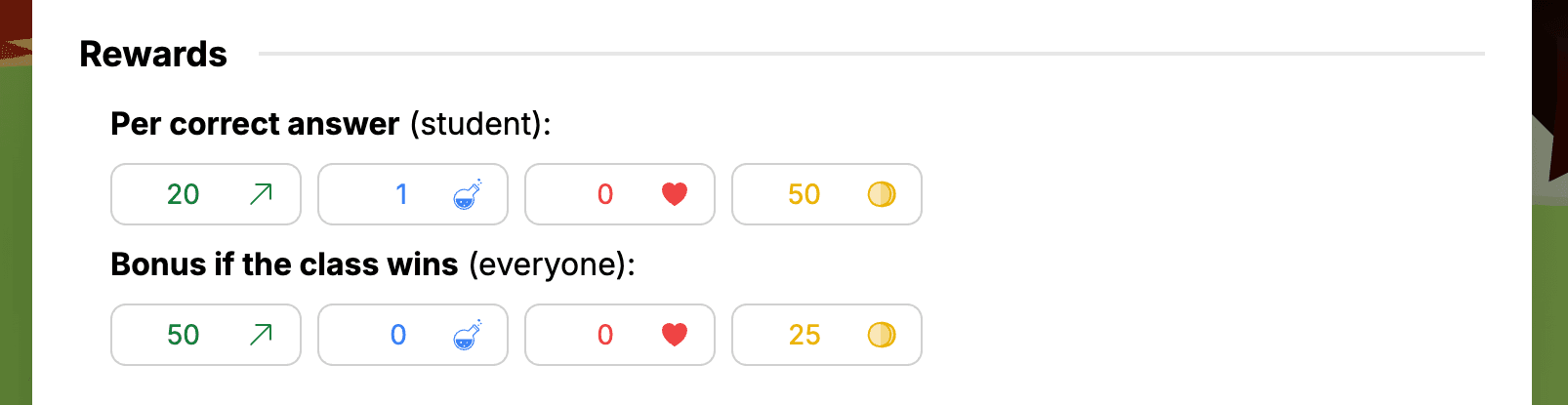
- Students earn Experience, gold or mana for each right answer, and the whole class gets a bonus when the monster is defeated. The rewards go straight into the classroom game, where students level up their avatars.
The Monster Battle teacher tool is free with a ClassMana account. The version with random picks and rewards is part of a
ClassMana class: every new teacher gets a trial class for three weeks, and a plan costs $75 a year in the US (€65 in
most of Europe). See the Monster Battle guide for every setting.
What teachers say
These are real comments from teachers who use ClassMana, quoted as they wrote them.
I like the boss battles. It is more engaging than just asking questions😇Simona Blažková

Gene Jara
The dragon meter it’s my best friend for group control, and
the boss battle help me to motive my students to participe
We use the Monster Encounters almost daily to turn boring worksheets into something they look forward to!A teacher on Reddit (r/classmana)
FAQ
What are good review games for the classroom?
Good classroom review games make every student think about every question. Grudgeball, Trashketball, Whiteboard Showdown
and a whole-class Boss Battle work in almost any subject and need no technology. For a digital option, Kahoot!,
Wayground or a one-screen game like Baamboozle or Monster Battle work well.
What are fun review games for high school?
High school students like games that are quick, social and a little competitive: Grudgeball, Quiz Quiz Trade, Hot Seat,
Review Relay and an escape room review. A Boss Battle against a monster also works well with older students, because it
feels like the video games they already play.
What review games don't need technology?
Grudgeball, Trashketball, Boss Battle on the board, Jeopardy with sticky notes, Whiteboard Showdown, Around the World,
Four Corners, Quiz Quiz Trade, Hot Seat, Inside-Outside Circle, Review Relay and Taboo all work without technology.
How do you play Grudgeball?
Each team starts with ten X's on the board. A team that answers a question correctly erases two X's from other teams,
then takes a shot at the trash can for the chance to erase more. A team that loses all its X's can earn some back by
answering correctly. The team with the most X's at the end wins.
How do you play Trashketball?
Teams take turns answering review questions. A correct answer earns a point and a shot at the trash can with a paper
ball. A shot from the near line earns one extra point, a shot from the far line two. The team with the most points wins.
What are good math review games?
Around the World and Whiteboard Showdown work for math facts, Review Relay for multi-step problems, and a Boss Battle
for mixed review: the class defeats the monster with correct answers. One teacher wrote that their class "defeats
monsters with mental arithmetic problems" in ClassMana (translated from German).
What is a free alternative to Kahoot for review?
Free options include Wayground (formerly Quizizz, free Basic plan for up to 100 students), the free Basic plan of
Baamboozle, and ClassMana's Monster Battle, which runs on one screen and needs no student devices. No-tech games like
Grudgeball and Whiteboard Showdown are free too.
How do I keep every student involved in a review game?
Let every student write down an answer before anyone says it out loud, pick who answers at random instead of taking
raised hands, and don't eliminate students who answer wrong. A shared reward for the whole class also helps, because
students then help each other instead of competing.
How long should a review game take?
Plan 15 to 30 minutes, with most of that time spent on questions. A game of 10 to 20 questions is enough for one topic.
For a final review before a test, a full lesson works if you mix two games, such as Whiteboard Showdown followed by
Grudgeball.
Try one this week
The moral of the story? The game matters less than the questions and the rule that everyone answers every one of them.
Pick one game from this list for your next review lesson, and if your class likes monsters,
try a Monster Battle for free.
Join the Conversation! Have thoughts or questions about this article? Join our ClassMana Facebook Community to share your ideas, ask questions, and connect with other like-minded educators!